Graphics card cooling

Grindspine

Moderator
I will have to post more on this topic later, but I have been considering if I need to upgrade cooling on my 8800GT card.

I have an XFX brand nvidia 8800GT, xt (extreme) version. This version is overclocked from the 600 core and 1900 mhz memory clocks to 640 mhz core and 1950 mhz DDR3 memory and has a larger fan intake than the reference design.

I have reseated the heatsink using Arctic Silver 5 Thermal paste and use an addition heatsink on the back of the card, a Thermalright HR-11 high rise cooler. I am currently using Rivatuner to ramp the fan speed from the stock 29% up to 60% to keep the temperatures at 55* C idle and 70* C load. Without increasing the fan speed, I idle at 64* and load near 78* C.

I'll post some pictures later, but am curious to know what cooling solutions others on the forum use for their graphics cards.
 
im not sure what temps my card runs at (i have a 8600 GT XXX edition from XFX sitting waiting for a body transplant), but i never have a problem with stuff getting hot.

i think you have other problems m8....70* C is something along the lines of 170-180*F i dont have a temperature gauge in my computer but mine NEVER get that hot.
 
Graphics cards are designed to hit up to 120C of brutality before damage starts occurring, but I wouldn't like my cards anywhere near that limit. I've seen 8800GTX cards in SLI hit 104 and 112 before, but we quickly dropped temps with extra fans and blowing the dust out.
 
Phoenix said:
im not sure what temps my card runs at (i have a 8600 GT XXX edition from XFX sitting waiting for a body transplant), but i never have a problem with stuff getting hot.

i think you have other problems m8....70* C is something along the lines of 170-180*F i dont have a temperature gauge in my computer but mine NEVER get that hot.

That is the core temperature, the heatsink is cooled by surrounding air. A temperature reporting program (like Speedfan) is really necessary to see the core temps.

I don't think I've ever seen my card go over 78*C, and that's after a half an hour of Unreal 3 Tournament with the fan at the stock 29% (low) setting.

It's idling 60*C now, but that's because the fan is at a quiet 42%.
 
Outside of watercooling I think you've done pretty much everything there is to do. OR... use a wine cooler as a computer case. sounds nuts but wine coolers (and if you're going to do this buy a decent one) don't condensate like a fridge, it most cases it's cheaper than an elaborate watercool set up, has a cool glass front window, every goes wtf when they see it, and you can keep a frosty beverage close by for those long UT sessions! Sounds like total bs but I went to high school with a guy that did that. It's basically thermoelectric cooling with out all the pain in the butt steps you've got to take to seal everything off, totally unrealistic but definatly internet worthy!
 
Sounds like a nifty idea and an excuse to get a wine cooler!

I have considered throwing a heatpipe stile heatsink fan on the 8800gt, perhaps a Thermalright HR-11 or a Zalman ZV9. Short of that, it has airflow through the case. Heat is not trapped behind the case (desk modification involving a hack saw). The Thermalright HR-03 cools a little bit passively. I could throw a fan on that, but I wouldn't expect more than 1-2*C cooling from an 80mm fan on it.
 
I've always just used stock cooling. I don't really bother looking at temps unless I start getting BSOD's or fragmenting. I think they are built to withstand quite a bit of heat.
 
x2 said:
I've always just used stock cooling. I don't really bother looking at temps unless I start getting BSOD's or fragmenting. I think they are built to withstand quite a bit of heat.
this..

if youve got problems with other componets getting hot (ram, CPU, etc) then youve got cooling problems altogether.
 
Phoenix said:
this..

if youve got problems with other componets getting hot (ram, CPU, etc) then youve got cooling problems altogether.

Not at all, my RAM and CPU run pretty cool, well below 50*C.
 
At this point I'm just wondering why Unreal Tournament 3 crashes after about a half an hour of play time. I've got the drivers for graphics and soundcard up to date. Temperature problems were my next guess.
 
x2 said:
Is there patches for the game? Are they all up to date? Is anything in your system overclocked?

Yes, games are up to date via Steam.

Yes, my Core 2 Duo is overclocked from 2.53 ghz frequency, 1066 mhz front side bus, to 3.16 ghz/1333 mhz fsb. That's a 25% overclock, but it has been stable running like that for months and does not get over 46* C.
 
Hmm so no crashing with other games? If you did not already, make sure you increased Voltage to both your CPU, Northbridge, and even RAM if that is overclocked. I am also curious if you've ever ran a stress test program such as Prime95? I ask because your PC can seem stable during everyday use, but could fail under high stress. If it fails Prime95 stress tests it will surely not be stable for gaming. Sorry if I just told you a bunch of stuff you already know :P
 
I guess I'm an oddball when it comes to stress testing. I first hit up 3DMark, to see if I can make it through there, then I go to Prime95, then finally to running a final encode in Premiere Pro. I've had Prime95 stability, but Premiere would crash my computer like no other.

So I now run my computer to Premiere stability, which makes things more rigorous than just Prime95 for some reason.
 
I haven't done specific stress testing as I've never had problems 'til downloading Unreal Tournament 3.

If it helps at all, 3dmark rates my computer as a score of 12,200. As far as changing processor voltage, with the specific overclocking method, a BSEL pin mod, voltage should be stable. Only the front side bus frequency is changed, which forces the core frequency up in speed.
 
your temperature inside your box should NEVER exceed 100*F inside of it (not counting direct contact with hot parts.) what does your cooling system look like in the routing?
 
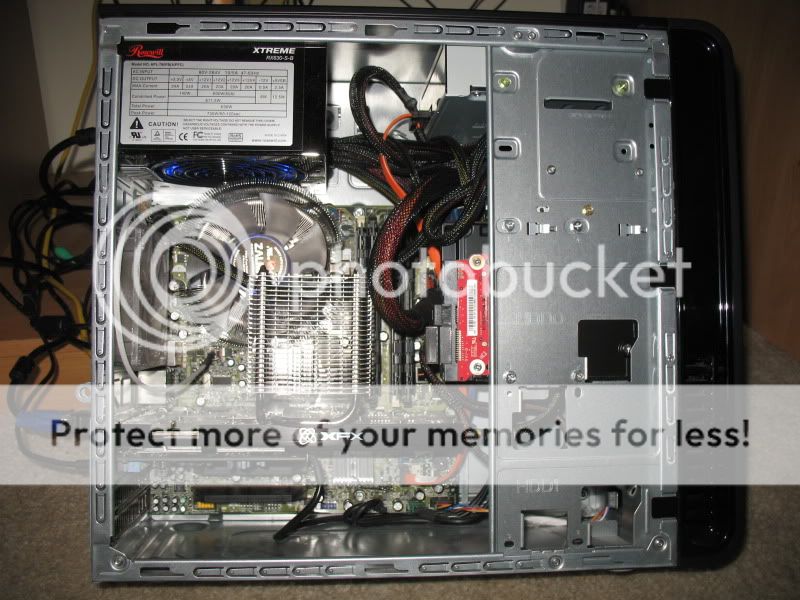
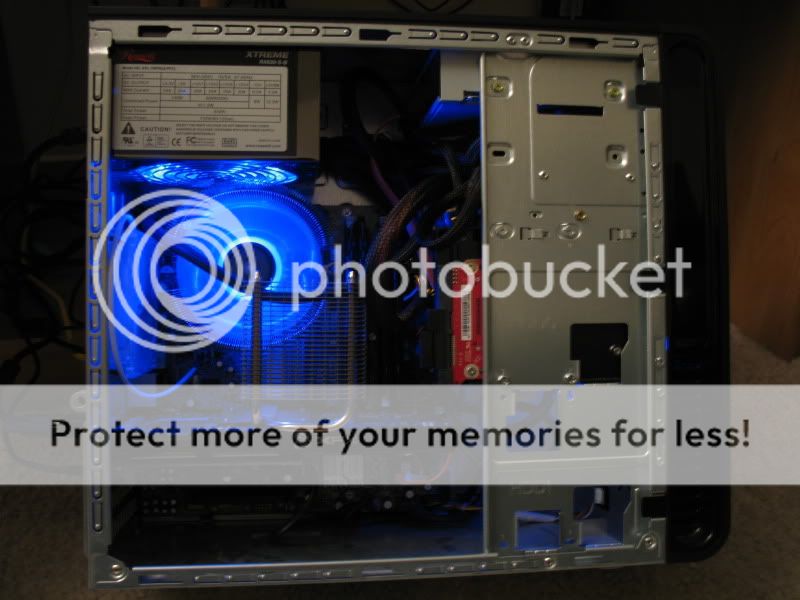
Okay, here it is quoted from the gaming computer specs thread:

summersend09011.jpg


Here is a slightly updated picture of the computer's innards. I changed out the 2x 1gb stock memory with heat spreaders to 4x 1gb sticks of PNY XLR8 high performance memory at DDR2 6400 - 800mhz with 4-4-4-12 timings. I then added Vantec PCI slot covers to the open PCI slots below the graphics and sound cards for a more finished look.

summersend09007.jpg


The Rosewill PSU runs cool (at over 80% efficiency at 630 watts with active power correction) and very quietly with a 120mm fan. The Zalman CPU cooler was DEAD silent and keeps my Core 2 Duo cool even after the overclock. The XFX 8800GT Alpha Dog has a larger fan intake than most 8800 nVidea cards, and with the Thermalright HR-11 heatsink, I never push it past the minimum fan speed.
 
Back
Top