

Graphics card cooling

Grindspine

Moderator
I'm revisiting the idea of upgrading the cooler on my old XFX 8800GT. It's the Alpha Dog XT version overclocked to 640mhz core frequency with the larger 60 mm impeller on the cooler.

geforce-8800-gt-alpha-dog-ed.jpg


I reapplied Arctic Silver 5 thermal paste on the GPU and added a Thermalright HR-11 back side cooler when I first got the card.
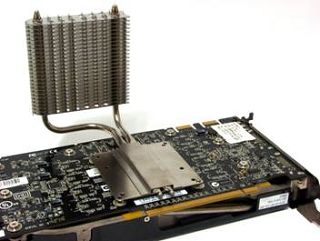
Thermalright%20HR-11.jpg


I cleaned dust out of it with canned air earlier this week and decided to look around at what coolers are still available for the 8800GT.

note: I'm not ready to drop a few hundred on a newer DX11 card yet, so wanted to see if I could push this card a little further over the next year.

I already have a set of aluminum ramsinks machined by iandh similar to these:

71442d1209011770-pts-iandh-9800-gtx-heatsinks-stock-yhst-65556269779593_2000_97033827.gif


For the actual GPU cooling, I have it narrowed down to either a Zalman VF900 or Arctic Cooling Accelero.

The Arctic Cooling Accelero is passive with copper heatpipes and aluminum fins. It has tested to be able to handle an 8800GT at load without an additional fan, though I am a bit wary of passive cooling. Twin fans can be clipped onto the fins though with a 3 pin plug.

8f83271e05458df06337dcbeedac0a90_5.png


The Zalman VF900 is all copper and runs on a 3 pin fan.
vf900LED_01.jpg


The Arctic Cooling Accelero Twin is similar to the Accelero above, but runs dual 80mm fans with a PWM fan header.

Thoughts?
 
Looks pretty good and I suspect you will get a little extra out of the card with it on there.

I replaced the fan of my 8800GTX with Arctic Cooling Accelero Xtreme 8800 and it made a much more stable and cooler PC when OCing.
 
I still haven't decided between the Zalman VF900 or Arctic Cooling Accelero.

8f83271e05458df06337dcbeedac0a90_5.png


vf900LED_01.jpg


Either one will work well for the 8800GT... After looking at prices on Direct X 11 cards I am definitely not ready for a full card upgrade... Maybe next fall I'll be able to move up to a GTX 400 series card. That means I need a cooler that'll at least get my cards temps down over summer even with a 20% overclock. I'm going to shoot for a stable 720mhz core on the 8800GT (G92) GPU.
 
Let us know how that goes Grind. The one thing I don't trust myself doing on a PC is overclocking. Maybe I'll teach myself sometime but at the moment I have to just bite the bullet and upgrade.

Can you watercool GPUs?
 
Yes, there are watercooling blocks available for the 8800GT and pretty much any newer high end nvidia or ATI card. I am pretty happy with the air cooling on my CPU (Zalman 8700NT and Arctic Silver 5) even with the 25% overclock from 2.53 to 3.16 ghz. I want to stick with air cooling for the GPU too, but have it fairly quiet. A fully passive cooler is going to be quietest, but also will not move heat as well, so think I will end up either with the Zalman with a resistor in line to quiet the fan or the Accelero with a 4-pin PWM fan attached to it...

At the moment, I think I might go for the Zalman based on the fact that the base is mirror smooth. The heat transfer from the CPU or GPU is very dependent on the base of the heatsink being lapped and polished smooth and a good application of thermal paste. I may even spring for some Arctic Cooling MX-4 over what's left of the Arctic Silver 5 I have.

As far as overclocking a GPU, nvidia and ATI have overclocking utilities. There is also a program called Rivatuner that can adjust clock and fan speeds. I have used Rivatuner before and pushed my card to 680 mhz core with the stock cooler. It would crash out at 690 mhz. With a better cooling scheme, I should be able to push it over 700 mhz, especially considering that it was a better binned GPU chip (factory overclocked by 7% from XFX). Once I find a stable speed, I'd flash the BIOS to always boot with the higher core, shader, and mem speeds.
 
Here's a better shot of my current layout. I took the card out last night to clean out the dust with canned air. It is still idling at 62* though, which is hotter than I'd like.

At least from this shot, it can be seen that the x-fi soundcard does not actually block the stock cooler's air intake at all...

Vostro8800gt.jpg
 
So, against the advise to get a Radeon that runs cooler, I decided to upgrade the cooling on my 8800GT to push it a bit further. Upgrading the cooler was far cheaper than getting a new graphics card. Besides, even a cooler running card could have problems with the positioning of my sound card getting in the way of the fan intake.

After experimenting with swapping out my sound card, I decided that the x-fi Titanium had to stay. That left me with very few options for a cooler for the 8800GT.

I went with a Thermalright HR-03 Rev. A heatsink. I would have preferred the GT version with six heatpipes, but could not find one for sale. Either one has heat pipes that wrap around. My sound card is actually hiding under the heat pipes now.

Along with a 120mm PWM Gelid fan, the iandh heatsinks mentioned above, and some Arctic Silver 5 thermal compound, it dropped 15* C from my idle temps (62* idle before, 47* idle currently) and a whopping 25* C difference at load playing Crysis with all settings on high and 2x AA (82* C before, 57* C at load now).

Pictures will follow :D
 
That is some impressive heat reduction.

I had problems with my soundcard and cooling upgrades for my 8800. My sound card had to come out in the end :-(

You have a very similar CPU cooler to what I have/had, too. Did you find cleaning the dust off the grills was a nightmare?!
 
Yeah, air dusting the 8800GT every few months only dropped the temps 2* C. It was just enough that if there was dust, the 82* load would hit 84 or 85* C and I'd occasionally have a game crash out.

Single slot coolers are such a pain to clean.
 
It's either the Arctic Silver 5 curing or slightly adjusting some stuff to give the fan a smidgeon more airflow, but my idle temps are down to 45* C and only hit 50* while playing Counter-strike: Source... Upgraded cooler = a good thing!
 
CreepinDeth said:
What program do you use to measure the temps? I have a slight feeling my Radeon is slightly above where it should be.

Right now I'm using Nvidia System Monitor. I have previously used Fanspeed. I think ATI also makes a temperature monitoring program.
 
Sweet. Good temps. I just ran GPU-Z and ATITools since there isn't a temp. monitor for radeons. But it did not go above 63 degrees at full load for 5 minutes. I think it's safe to say it runs cool enough. :)
 
Back
Top